
1My proposals
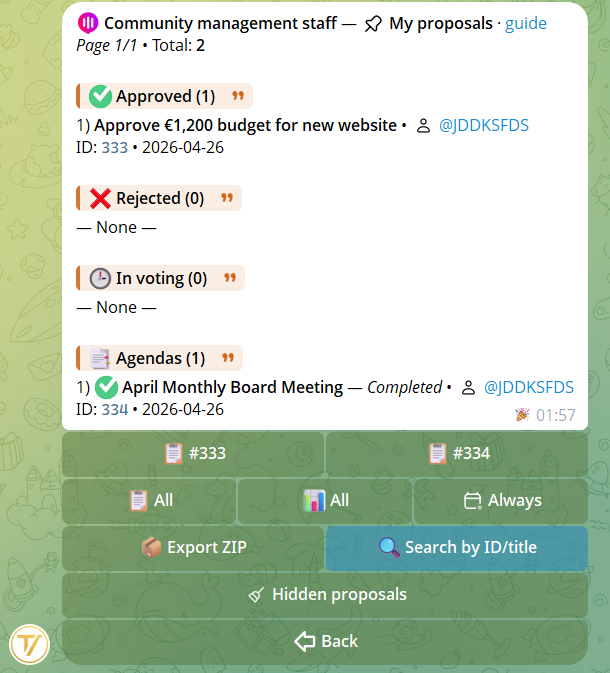
Every user can access the proposals they've created via the My proposals entry in the community menu. Available filters:
- Type — single proposals or agenda items
- Status — approved, rejected, voting, tie, published
- Period — last 7 days, 30 days, 90 days, or all
2Community proposals
Managers with the Manage proposals permission can see all community proposals, not just their own. Same filters (type, status, period) apply.
Regular Members only see their own proposals. Founder and Admin always see everything.
3Hidden proposals
If you no longer want to see a proposal in your personal list (without deleting it from the community database), you can hide it. From any proposal detail page, press Hide.
Hidden proposals can be retrieved from the dedicated section Proposals → Hidden:
- Individual restore — make a single proposal visible again
- Bulk restore — make them all visible
- Search — find a hidden proposal by ID or text
4Find a proposal
The search function allows queries by:
- Numeric ID of the proposal (e.g.
42) - Title text — partial match, case-insensitive
- Specific agenda items — format
12.1for item 1 of agenda #12
Visibility is role-based: founder and admin see all community proposals, members only see their own.
5ZIP / PDF export
Users with the Data export permission can export proposals as a ZIP archive containing:
- Individual PDFs with full details for each proposal (title, description, per-group outcomes, comments)
- An attachments folder with the original media
- RSA SHA-256 digital signature to guarantee PDF integrity
Useful for archiving official minutes, presenting resolutions to an external assembly, or preserving a season's documentation.
Real samples
Here are the full ZIP archives the bot produces. Download them to see the PDFs, original attachments and the RSA digital signature.