
1Creation and viewing
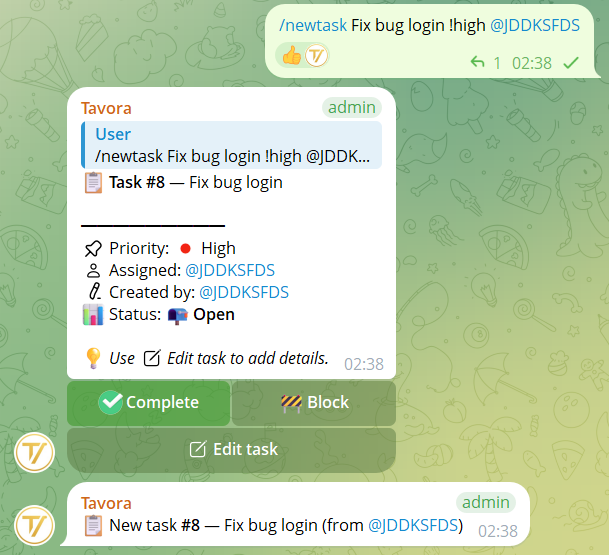
/newtask title
Create a task with optional inline parameters:
!high/!medium/!low→ priority@user→ assignmentDD/MMorDD/MM/YYYY→ due date (default 23:59)HH:MMafter the date → due time
Priority keywords are English-only: !high, !medium, !low.
Examples:
/newtask Buy markers/newtask Monthly report !high @mario 15/04/newtask Customer call !high @mario 20/04 18:30/newtask Fix login bug !high
💡 You can also reply to a message with /newtask to turn it into a task.
/totask
Converts a message (by replying) into a task: first line becomes the title, the rest becomes the description.
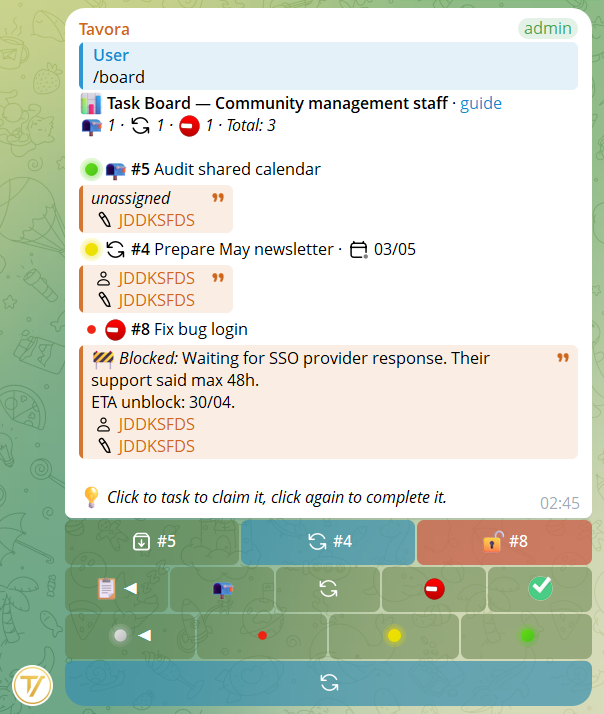
/board
Shows the interactive board (5 tasks per page in groups), paginated and filterable by status and priority.
/task · /tasks · /mytask · /mytasks
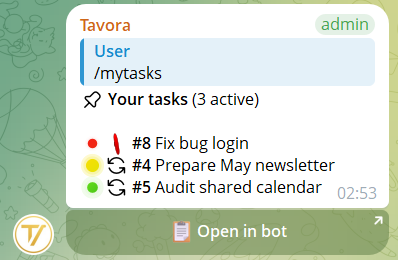
/task (or alias /tasks) without arguments shows tasks assigned to you. /task 5 shows the card for task #5. /mytasks and /mytask are aliases.
Blocked tasks show the block reason directly in the blockquote, truncated to 100 chars if long (open the card to see it fully).
2Task management
/done 5— Complete task #5/reopen 5— Reopen task #5/block 5 reason— Block the task with reason (max 1000 chars)/unblock 5— Unblock task #5/delete 5— Delete the task (creator or managers only)/claim 5— Claim a task not yet assigned/assign 5 @user— Assign the task to one or more users/unassign 5 @user— Remove an assignee/due 5 25/04— Set or change the due date
3Extra features
/note 3 text— Add a note to task #3 (max 2000 chars)/notes 3— View all notes for a task. Cards show a counter💬 (N)for public notes only/checklist 5followed by one or more items — Adds checklist items one per line (Shift+Enter for newline). Commas in the text are not separators. Max 30 items total./find— Search tasks by title or number (max 10 results)
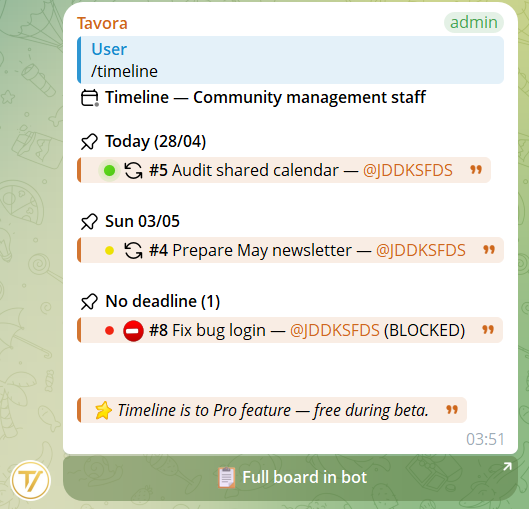
/timeline
Time view of group tasks sorted by due date, paginated in 14-day windows. Each day has a header outside the blockquote, and the day's tasks (with assignee, priority, optional BLOCKED badge) are gathered inside the quote. Sections are separated by an empty line for readability.
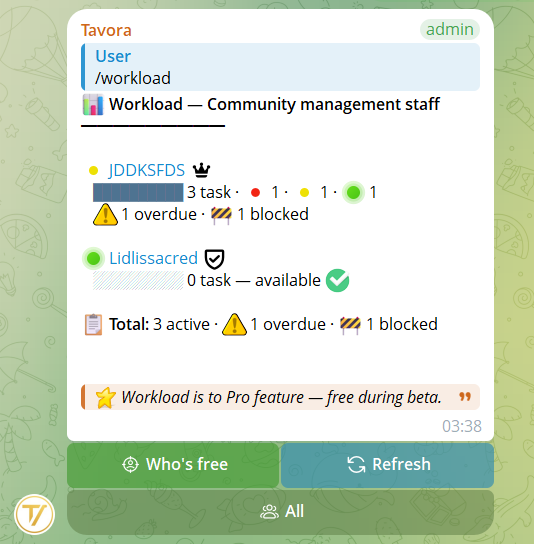
/workload
Only for those with the "Manage tasks" permission (founder, admin or roles with manage_tasks). Shows member workload with:
- Absolute traffic light 🟢 (0–2 tasks) · 🟡 (3–5) · 🔴 (6+)
- Relative bar proportional to the maximum workload in view
- Priority breakdown: 🔴 high · 🟡 medium · 🟢 low per member
- Alerts ⚠️ overdue tasks · 🚧 blocked tasks (per member)
- Total for the community in the footer
Buttons:
- 🎯 Who's free (green) — switch: filters to only members with 0 active tasks. Click again to return to the full view.
- 🔄 Refresh (blue) — re-fetch with current filters
- Cyclic role filter — switches between All and the roles actually present in the community (Founder, Admin, Member, custom). No useless buttons for non-existent roles.
Automatic pagination: 15 members per page with ◀ Prev / N/M / Next ▶ buttons. The totals shown always refer to the whole community (not just the visible page).
4Important details
- All commands have an anti-spam cooldown of 1-10 seconds depending on the action
- Task cards in groups show descriptions truncated to 800 chars (click the card to see the full text, up to 2000 chars)
- Edits auto-sync between private view and group view: change something in private and the group card updates too
- Claim: an unassigned task can be claimed by anyone with the "Create tasks" or "Manage tasks" permission (in addition to founder/admin who always can). Once claimed, the task moves to "In progress".
- Multi-assignees: a task can have multiple owners. In compact views (board, mytasks) up to 2 are shown + a counter
+Nfor the others. - Visible block reason: when a task is blocked with
/block N reason, the reason appears directly in lists (board, timeline, mytasks) truncated to 100 chars. - Deletion: besides
/delete N, from the task card in the group you can press Edit and then the 🗑 Delete (red) button. Always with a confirmation step and cleanup of reminders, notes, checklist and cards published in other groups.
/totask as a reply to a group message to turn an idea or decision into an actionable task, without rewriting it.