
1Community picture
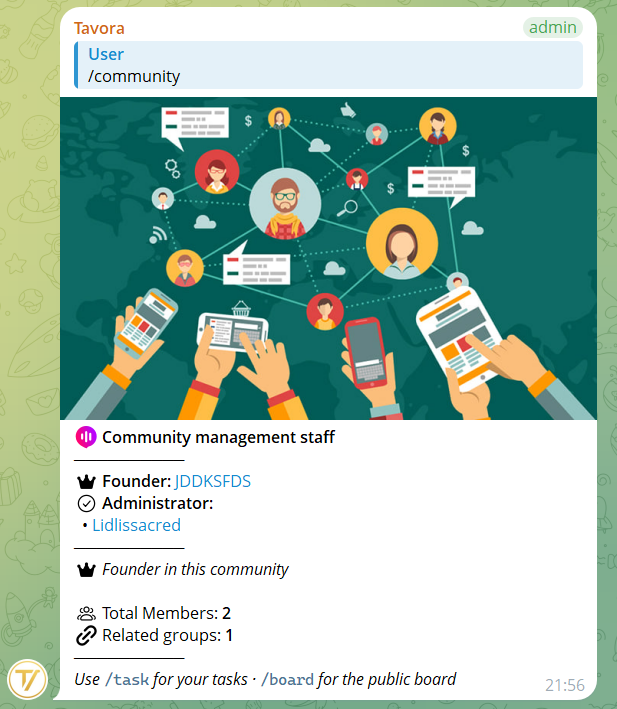
From Management → Customize, you can set a representative picture that's shown when someone uses the /community command in the group. Works like a group avatar, but at the entire community level.
You can remove this picture at any time.
2Community emoji
You can associate an emoji with your community. This emoji appears next to the community name throughout the bot interface and supports Telegram premium emojis (animated) too.
The custom premium emoji is stored as a numeric ID (custom emoji ID) and re-rendered correctly in every message where the community name appears, preserving the animation.
3Publication language
The community has a publication language (settable by the Founder under Management → Settings → Language) that determines the language of messages published in groups: proposal cards, vote outcomes, task announcements, broadcasts.
This language is separate from each user's personal language: you see the bot in private in your own language, but messages in groups follow the language chosen for the community. Consistency for all members.
4Other settings
From Management → Settings:
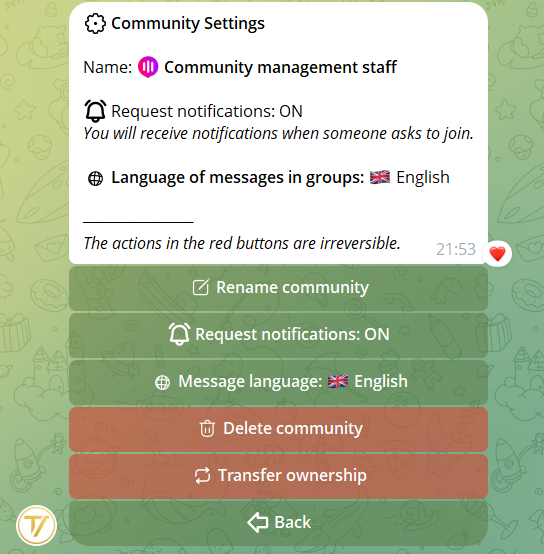
- Rename community — change the name at any time
- Request notifications — switch: enable/disable periodic notifications for pending join requests
- Language for messages in groups (Founder only) — the language the bot uses to publish in groups (see previous step)
- Transfer ownership (Founder only) — hand over the community to another user. The recipient must accept
- Delete community (Founder only) — see next step for the safety flow with a 10-day grace period
5Delete the community
Only the Founder can delete a community. When you do, the community enters a 10-day waiting period before final deletion.
During these 10 days:
- Members have already been removed and no longer see the community
- Data (proposals, votes, tasks) is still in the database
- You can request community recovery by email
After 10 days, the community and all its data are deleted permanently and automatically. There's no recovery afterwards.