
1What groups are for
A Tavora community lives in the Telegram groups you link to it: that's where members vote on proposals, get announcements, and use task commands like /board, /newtask, /done.
You can have several groups in the same community — one for members, one for the board, one for committees — each with different permissions and flows. Maximum 10 groups per community.
2Method 1: automatic linking
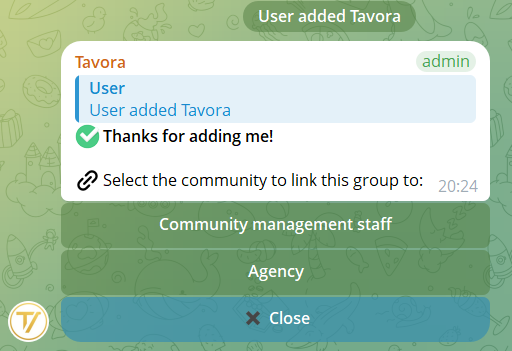
Add the bot to your Telegram group and promote it to administrator. The bot detects that it has been added and sends you a private message with the list of your communities: choose which one to link the group to, and the connection is done.
If the bot is already in the group but not yet linked, you can use the /link command directly in the group. The same community picker will appear.
3Method 2: manual linking
If you'd rather do everything from the private chat with the bot:
- Add the bot to the group and promote it to administrator
- In the group, use the
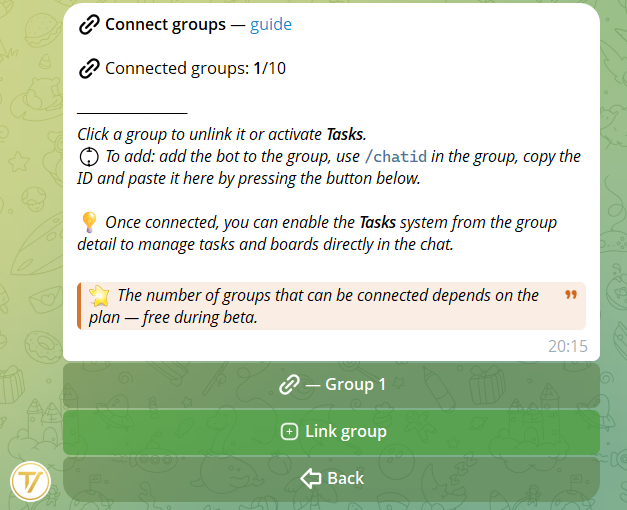
/chatidcommand to get the group's numeric ID - In private chat with the bot, go to Management → Groups → Add group and paste the ID
4Managing linked groups
For each group you can enable or disable settings either from the private chat or directly in the group with /settings:
- Receive proposals — if enabled, proposals are also sent to this group for voting
- Tasks in the group — if enabled, you can use task commands (
/board,/newtask,/done, etc.) in that group - Roles allowed to submit proposals — choose which custom roles can submit proposals to this specific group (visible only if proposal reception is enabled)
- Publication language — the community has a language chosen by the founder for messages published in groups (proposal cards, vote outcomes, tasks). You can change it from Management → Settings → Language
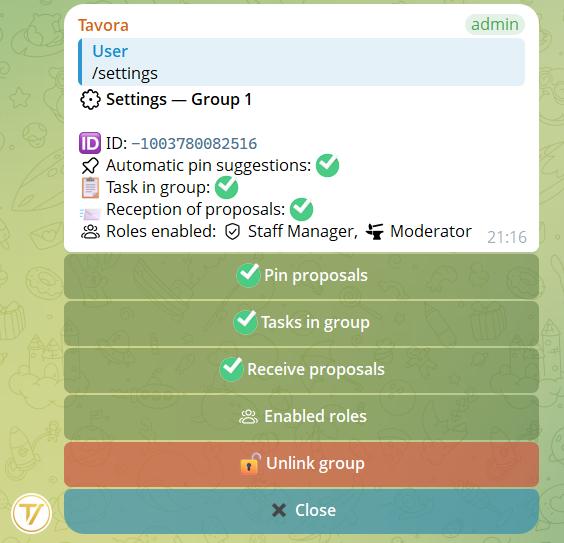
/settings directly in the group to switch options without going back to private chat.5Unlinking a group
To unlink a group: from the group list, click the group name → Unlink group. You'll be asked to confirm.
If the bot is removed from a group (kicked), the link is automatically broken and the community remains intact. Proposals and tasks already archived are not lost.