
1Single proposal vs Agenda
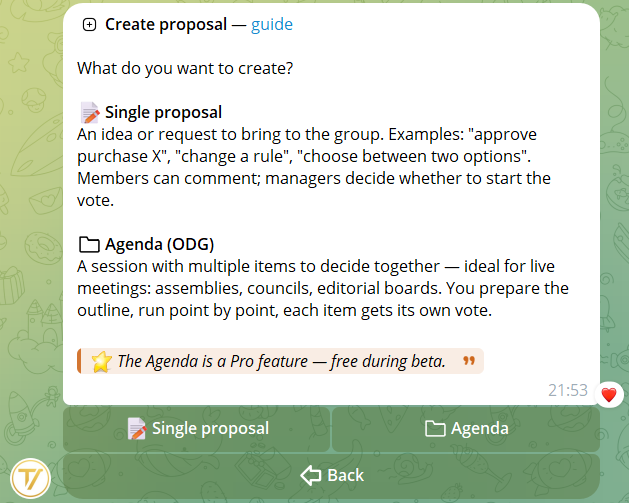
When you open the Create proposal menu, the bot asks what you want to create:
Single proposal
An idea or request to bring to the group. Examples: "approve purchase X", "change a rule", "choose between two options". Members can comment; managers decide whether to start the vote.
Agenda (multi-item)
A session with multiple items to decide together — ideal for live meetings: assemblies, councils, editorial. You prep the outline, run item by item, each item is voted on its own.
2Creation wizard (8 steps)
From the community home, select New proposal:
- Choose the type (single or agenda)
- Write a title (minimum 3 chars)
- Write a description (minimum 10 chars, optional for agenda items) with Telegram formatting support
- Add attachments (optional, max 3 per proposal): photos, videos, GIFs, documents, stickers, voice, audio, video notes
- See the preview of all content. The text is not editable after sending — check carefully
- Select which groups to send the proposal to (non-enabled groups appear with a lock)
- Send — the proposal arrives in the selected groups with the "Start vote" button
- Confirm — see the proposal archived in "My proposals"
3Drafts: save and resume
It's not mandatory to finish the proposal in a single session: during the wizard you can save the work as a draft and resume it whenever you want. Useful for long proposals, multi-item agendas, or when you realize you're missing some info.
How to save
- Single proposal — in the Preview step (step 5), you find the 💾 Save as draft button.
- Agenda — in the agenda menu (after adding at least one item), you find 💾 Save as draft. If a draft already exists, the button becomes 💾 Update draft.
Where to find them
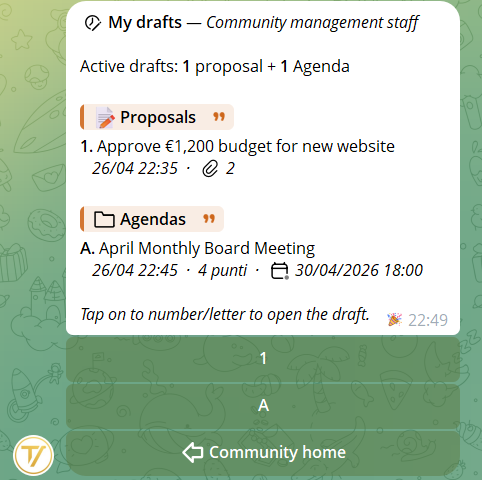
From the community main menu open 📝 My drafts: see the list of all your drafts divided into Proposals and Agendas. From here you can:
- Edit a draft — reopens the wizard at the point where you left it
- Duplicate — creates a copy you can experiment with
- Publish — turns it into a real proposal, with group selection and sending
- Delete — if you don't need it anymore
4Attachments and formatting
The description supports Telegram formatting: bold, italic, links, code blocks, quotes, and Telegram animated premium emojis too. Everything is preserved in the card published in groups.
For attachments: max 3 files per proposal, any media type supported by Telegram. They are stored as a reference (file_id), not downloaded to our servers: files stay on Telegram's servers.
5Agenda (multi-item)
The agenda works as a container of multiple items voted in sequence:
- The agenda as a whole has only a title (the "session outline"). Descriptions live in the individual items
- You can optionally set the 📅 meeting date (button Set meeting date in the agenda menu). The date appears in the agenda announcement in groups and in the final report
- Add up to 20 items, each with its own title, own description and own attachments
- Reorder items from the dedicated menu
- Select target groups once, for the whole agenda
- The items are then voted on one at a time in the groups (see Voting guide)
Practical examples for every type of organization
An agenda is perfect wherever there are recurring meetings with multiple decisions to take together. Here are concrete examples from Tavora templates:
Association / Party
Ordinary March assembly
- Approve 2025 final accounts
- Approve 2026 budget
- Renew Board offices
- Amend statute art. 7
Company / Team
Q2 leadership meeting
- Approve marketing budget
- New hires: 2 developers
- Adopt smart-working policy
- Renew cloud vendor contract
Condominium
Annual condo assembly
- Approve final accounts
- Façade maintenance estimate
- Amend parking rules
- Appoint new administrator
Student council
November Institute Council
- School assembly plan
- End-of-year party budget
- 5th year trip proposal
- New library opening hours
Editorial
Weekly editorial meeting
- Approve weekly schedule
- Investigation: go or pass?
- Change comment policy
- Special issue release calendar
Telegram / Discord staff
Monthly moderators meeting
- Update group rules
- Permanent ban for reported user
- New community event in June
- Promote 2 new helpers to mod
6Limits and rate limit
- One proposal every 30 seconds — anti-spam rate limit per user
- Maximum 3 attachments per single proposal or per agenda item
- Maximum 20 items per agenda
- Proposals pending for more than 7 days are auto-finalized by the system (closed without vote)